
How to Play Rummy Online: 2P & 6P Table Guide (اردو گائیڈ)
By Rummy-Game Editorial Team • Published • Last Verified • 5 min read
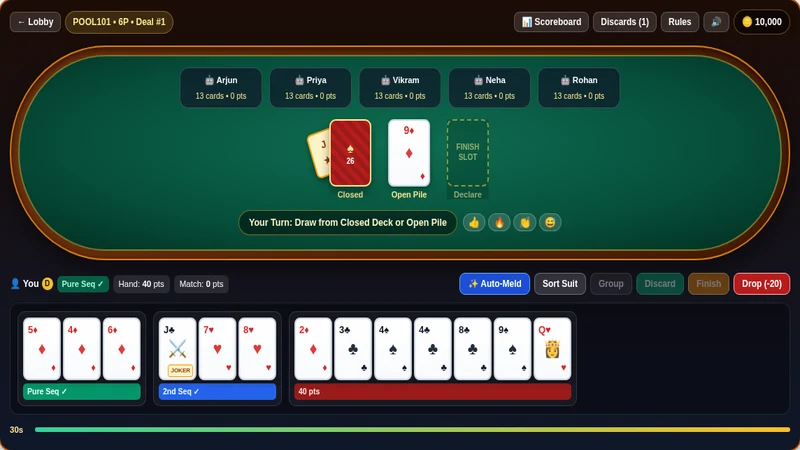
Direct Answer: To play Rummy Online, choose your format (Points, 101/201 Pool, or Deals) and seat count (2P or 6P) in the lobby, draw from the Closed Deck or Open Pile, arrange your 13 cards into at least 2 sequences (1 Pure Sequence), and drag your 14th card into the Finish Slot to declare.
Step 1: Configure Your Table in the Rummy Online Lobby
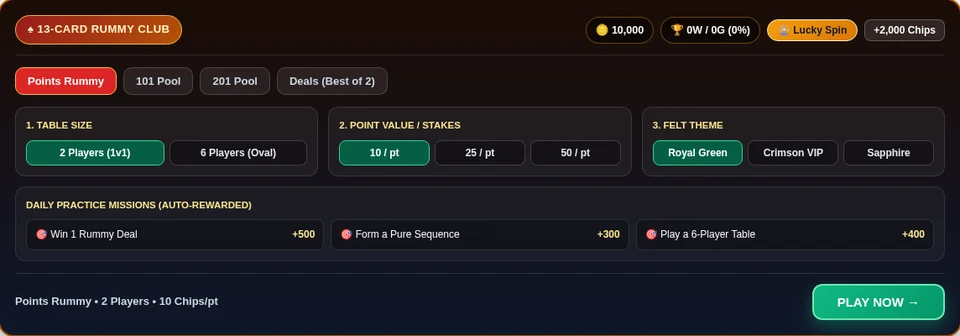
- Choose Format: Pick Points Rummy for single-hand speed, 101 / 201 Pool for multi-deal elimination, or Deals (Best of 2).
- Select Seats & Stakes: Switch between 2 Players (1v1) and 6 Players (Oval Table), then set your chip value (
10,25, or50 Chips/pt) and felt theme (Royal Green, Crimson VIP, or Sapphire). - Daily Spin & Missions: Spin the 🎡 Lucky Spin wheel or complete missions (winning a deal, forming a Pure Sequence, playing 6P) for bonus practice chips.
Step 2: Read the Oval Table, Wild Joker & Discard Pile
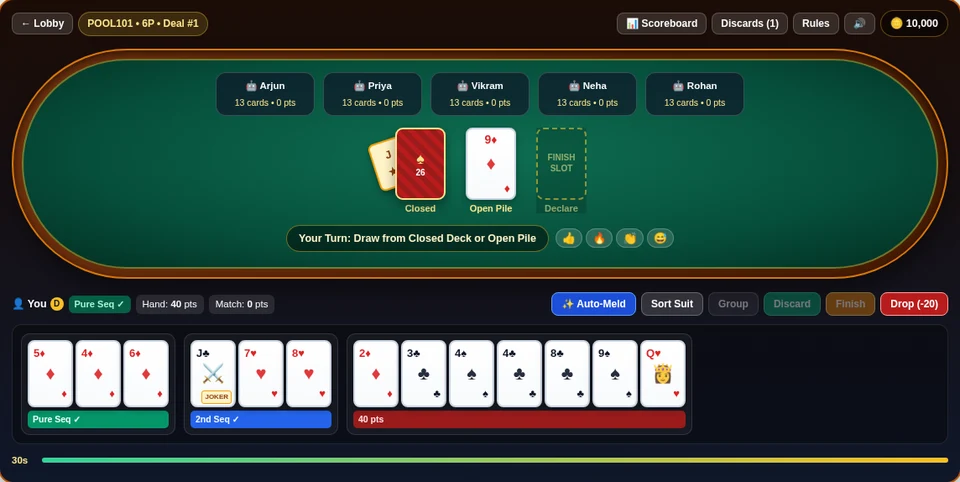
- Tucked Wild Card Joker: The Wild Joker sits tucked sideways underneath the Closed Deck. Any card of that rank in your hand automatically displays a
JOKERbadge (0deadwood points). - Draw Phase: On your turn (30-second countdown), click Closed to draw a hidden card or Open Pile to pick the top discarded card.
- Open-Pile Rule: Just like real cash rummy apps, you cannot discard the exact card you just picked from the Open Pile on the same turn.
Step 3: Sort Melds & Declare via the Finish Slot
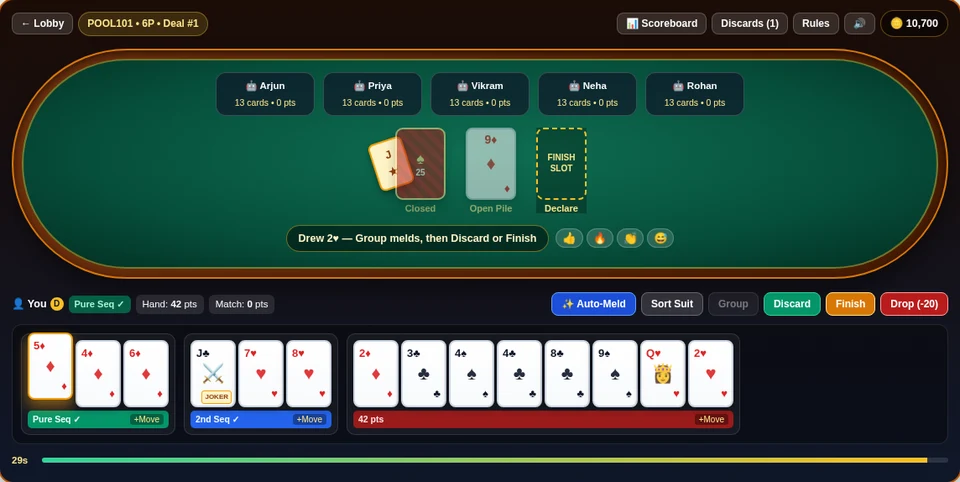
- Colored Meld Bars: Tap ✨ Auto-Meld (or drag cards between groups) to see real-time validation:
- Green (
Pure Seq ✓): 3+ consecutive cards of the same suit without Joker substitution. - Blue (
2nd Seq ✓): Second sequence (Pure or with Wild/Printed Joker). - Gold (
Set ✓): 3–4 cards of the same rank in different suits. - Red (
pts): Unmatched deadwood points (capped at80pts).
- Green (
- Finish Slot: Once 13 cards are valid and you hold a 14th extra card, select it and click Finish (or drag it directly onto the dashed Finish Slot) to reveal all opponents’ hands and collect your chips!
Launch the live table now at Rummy Online (/tools/play-rummy-free/), or compare verified real-money platforms on our All Rummy Apps Directory.
Video Walkthrough
Watch this step-by-step 13-card rummy demonstration before joining real-money tables.
 Tutorial 04:18
How to Play 13-Card Rummy Online Step-by-Step
Visual walkthrough of Rummy Online lobby, Wild Joker, Pure Sequences, and Finish Slot declarations.
Frequently Asked Questions
Step-by-step Rummy Online tutorial with real table screenshots: lobby setup, tucked Wild Joker, meld bars, Finish Slot & 101 Pool rules.
Do I need to register or deposit money to play Rummy Online here? +
No. You can launch our Rummy Online browser client immediately with 10,000 free practice chips, Daily Lucky Spin rewards, and Practice Missions—zero sign-up or download needed.
How do I declare a valid show on the Rummy Online table? +
Draw a 14th card, arrange 13 cards into at least 2 sequences (including 1 Pure Sequence without Jokers) and valid sets, then select your 14th card and click Finish (or drag it onto the Finish Slot).
What is the difference between 2-Player and 6-Player Rummy Online tables? +
2-Player tables are fast 1-on-1 duels, while 6-Player oval tables include 5 AI opponents with rotating Dealer chips, higher Pool/Deals pots, and multi-player discard reading.
Compare India's top 5 RNG-certified rummy apps with free practice lobbies and ₹100 min UPI withdrawals.